Multi-Agent Systems: Orchestrating AI Teams with LangGraph and CrewAI
Introduction
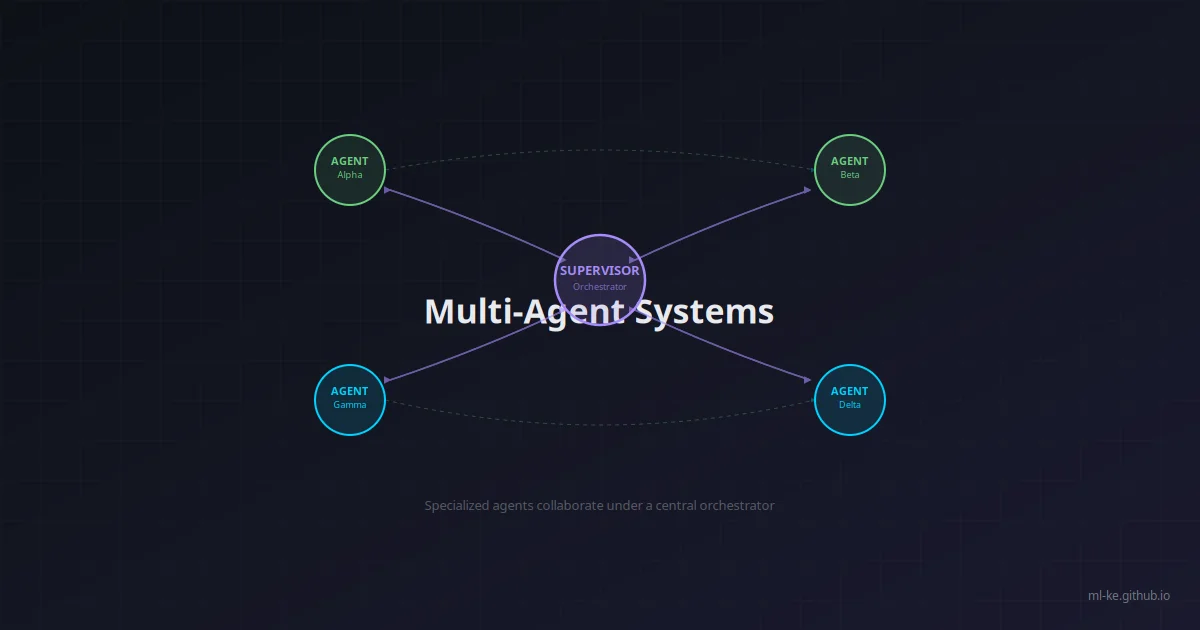
So far, we’ve built single agents that can reason, remember, and use tools. But some problems are too large or complex for one agent. Multi-agent systems distribute the cognitive load across specialized agents — each with its own tools, memory, and personality — coordinated by an orchestration layer.
Consider a research task: “Analyze the impact of AI on Kenya’s agricultural sector.” A single agent must search, analyze economics, understand agriculture, and write a report. A multi-agent system, however, can deploy:
- Research Agent: Searches for latest data and publications
- Economics Agent: Analyzes economic indicators and market data
- Agriculture Agent: Evaluates farming practices and crop impacts
- Writer Agent: Synthesizes findings into a coherent report
- Supervisor Agent: Coordinates the team, delegates tasks, resolves conflicts
This post explores multi-agent patterns and builds a working system using LangGraph for stateful orchestration and CrewAI for role-based teams.
When to Use Multi-Agent Systems
| Scenario | Single Agent | Multi-Agent |
|---|---|---|
| Simple Q&A | ✅ Best choice | ❌ Overkill |
| Complex research | ⚠️ Can work but slow | ✅ Parallel research |
| Diverse expertise needed | ❌ One model, one perspective | ✅ Specialized agents |
| High reliability | ❌ Single point of failure | ✅ Redundancy and consensus |
| Continuous operation | ❌ No built-in failover | ✅ Agent can monitor agents |
Multi-Agent Patterns
1. Supervisor/Worker (Hierarchical)
One agent (supervisor) delegates tasks to worker agents and synthesizes results. The most common and practical pattern.
1
2
3
User → Supervisor → [Researcher, Analyst, Writer]
                         ↓
                     Synthesized Result
2. Round Robin / Debate
Agents take turns contributing. Useful for brainstorming, critique, and refinement.
1
Agent A → Agent B → Agent C → Agent A (loop)
3. Consensus / Voting
Multiple agents independently solve the same problem and vote on the best answer. High reliability, but expensive.
1
[Agent A, Agent B, Agent C] → Voter → Final Answer
4. Pipeline
Each agent processes the output of the previous one. Good for workflows with clear stages.
1
Retriever → Extractor → Summarizer → Writer
Building with LangGraph
LangGraph is a framework for building stateful, multi-agent applications. It models agent workflows as graphs (nodes + edges) with persistent state.
Installation
1
pip install langgraph langchain-openai
Step 1: Define Agent Nodes
Each agent is a node in the graph — a function that receives state and returns updates:
1
2
3
4
5
6
7
8
9
10
11
12
13
14
15
16
17
18
19
20
21
22
23
24
25
26
27
28
29
30
31
32
33
34
35
36
37
38
39
40
41
42
43
44
45
46
47
48
49
50
51
52
53
54
55
56
57
58
59
60
61
62
63
64
65
66
67
68
69
70
71
72
73
74
75
76
77
78
79
80
81
82
83
84
85
86
87
88
89
90
91
92
93
94
95
96
from typing import TypedDict, List, Annotated, Literal
from langgraph.graph import StateGraph, END
from langchain_openai import ChatOpenAI
from langchain_core.messages import HumanMessage, AIMessage, SystemMessage
import operator


# Shared state for the graph
class AgentState(TypedDict):
    messages: Annotated[List, operator.add]  # Conversation history
    next_agent: str                         # Next agent to run
    task: str                               # The user's task
    research_results: str                   # Accumulated research
    analysis: str                           # Economic analysis
    final_report: str                       # Final output
    iteration_count: int                    # Loop counter


# Shared LLM
llm = ChatOpenAI(model="gpt-4o", temperature=0)


# --- Agent Definitions ---

def research_agent(state: AgentState) -> dict:
    """Research agent: searches for information on the task."""
    prompt = f"""You are a research specialist. Your job is to find and compile
relevant information about the following task. Be thorough and cite sources.

Task: {state['task']}

Provide comprehensive research findings with key data points, statistics,
and sources. Format as bullet points."""

    response = llm.invoke([
        SystemMessage(content=prompt)
    ])

    return {
        "messages": [AIMessage(content=f"Research Agent: {response.content}")],
        "research_results": response.content,
        "next_agent": "analyst"
    }


def analyst_agent(state: AgentState) -> dict:
    """Analysis agent: evaluates research and provides insights."""
    prompt = f"""You are a data analyst specialist. Analyze the following research
and provide:
1. Key insights and patterns
2. Data quality assessment
3. Correlations and causations
4. Gaps in the research

Task: {state['task']}

Research:
{state['research_results']}"""

    response = llm.invoke([
        SystemMessage(content=prompt)
    ])

    return {
        "messages": [AIMessage(content=f"Analyst Agent: {response.content}")],
        "analysis": response.content,
        "next_agent": "writer"
    }


def writer_agent(state: AgentState) -> dict:
    """Writer agent: produces the final report."""
    prompt = f"""You are a professional writer. Synthesize the following research
and analysis into a well-structured report.

Task: {state['task']}

Research: {state['research_results']}

Analysis: {state['analysis']}

Write a clear, engaging report with:
1. Executive summary
2. Key findings
3. Detailed analysis
4. Conclusions and recommendations"""

    response = llm.invoke([
        SystemMessage(content=prompt)
    ])

    return {
        "messages": [AIMessage(content=f"Writer Agent: {response.content}")],
        "final_report": response.content,
        "next_agent": "end"
    }
Step 2: Build the Graph
1
2
3
4
5
6
7
8
9
10
11
12
13
14
15
16
17
18
19
20
21
22
23
24
25
26
27
28
29
30
31
32
# Initialize the graph
workflow = StateGraph(AgentState)

# Add nodes
workflow.add_node("researcher", research_agent)
workflow.add_node("analyst", analyst_agent)
workflow.add_node("writer", writer_agent)

# Add edges with routing
workflow.add_conditional_edges(
    "researcher",
    lambda state: state["next_agent"],
    {"analyst": "analyst", "end": END}
)

workflow.add_conditional_edges(
    "analyst",
    lambda state: state["next_agent"],
    {"writer": "writer", "researcher": "researcher", "end": END}
)

workflow.add_conditional_edges(
    "writer",
    lambda state: state["next_agent"],
    {"end": END, "researcher": "researcher"}
)

# Set the entry point
workflow.set_entry_point("researcher")

# Compile
app = workflow.compile()
Step 3: Run the Multi-Agent System
1
2
3
4
5
6
7
8
9
10
11
12
13
14
15
16
17
# Initial state
initial_state = {
    "messages": [],
    "next_agent": "researcher",
    "task": "Analyze the impact of AI adoption on Kenya's agricultural sector, "
            "including crop yield improvements, cost savings, and adoption barriers.",
    "research_results": "",
    "analysis": "",
    "final_report": "",
    "iteration_count": 0
}

# Run the workflow
result = app.invoke(initial_state)

# Print the final report
print(result["final_report"])
Building with CrewAI
CrewAI takes a role-based approach — you define agents with roles, goals, and backstories, and they collaborate autonomously.
Installation
1
pip install crewai crewai-tools
Defining a Research Crew
1
2
3
4
5
6
7
8
9
10
11
12
13
14
15
16
17
18
19
20
21
22
23
24
25
26
27
28
29
30
31
32
33
34
35
36
37
38
39
40
41
42
43
44
45
46
47
48
49
50
51
52
53
54
55
56
57
58
59
60
61
62
63
64
65
66
67
68
69
70
71
72
73
74
75
from crewai import Agent, Task, Crew, Process
from crewai_tools import SerperDevTool, ScrapeWebsiteTool


# Tools
search_tool = SerperDevTool()
scrape_tool = ScrapeWebsiteTool()

# Agents
researcher = Agent(
    role="Senior Research Analyst",
    goal="Find comprehensive, up-to-date information on the assigned topic",
    backstory="You're a meticulous researcher with 15 years of experience "
              "in technology and market analysis. You leave no stone unturned.",
    tools=[search_tool, scrape_tool],
    verbose=True,
    allow_delegation=False,
    llm="gpt-4o"
)

analyst = Agent(
    role="Data Analyst",
    goal="Analyze research data and extract meaningful insights",
    backstory="You're a statistical genius who can spot patterns and trends "
              "that others miss. You transform raw data into actionable insights.",
    verbose=True,
    allow_delegation=False,
    llm="gpt-4o"
)

writer = Agent(
    role="Technical Writer",
    goal="Synthesize research and analysis into clear, compelling reports",
    backstory="You're a award-winning technical writer who makes complex "
              "topics accessible and engaging. Your reports are widely cited.",
    verbose=True,
    allow_delegation=False,
    llm="gpt-4o"
)

# Tasks
research_task = Task(
    description="Research the impact of AI on agriculture in Kenya. "
                "Cover: crop monitoring, precision farming, market access, "
                "and adoption challenges. Compile at least 10 key findings.",
    expected_output="A comprehensive research brief with 10+ bullet points, "
                    "each with data and sources.",
    agent=researcher,
)

analysis_task = Task(
    description="Analyze the research findings. Identify: (1) Top 3 opportunities, "
                "(2) Top 3 challenges, (3) Key stakeholders, (4) ROI estimates.",
    expected_output="A structured analysis with quantified insights and priorities.",
    agent=analyst,
)

report_task = Task(
    description="Write a final report synthesizing the research and analysis. "
                "Include executive summary, methodology, findings, and recommendations.",
    expected_output="A complete, publication-ready report in markdown format.",
    agent=writer,
)

# Create the crew
research_crew = Crew(
    agents=[researcher, analyst, writer],
    tasks=[research_task, analysis_task, report_task],
    process=Process.sequential,  # Agents work sequentially
    verbose=True,
)

# Run it
result = research_crew.kickoff()
print(result)
State Management and Communication
In multi-agent systems, how agents communicate is as important as what they communicate.
Shared State (LangGraph)
LangGraph’s AgentState acts as a shared whiteboard — each agent reads and writes to it. This is clean and debuggable.
Message Passing (Custom)
For more complex topologies, implement explicit message passing:
1
2
3
4
5
6
7
8
9
10
11
12
13
14
15
16
17
18
19
20
21
22
23
24
25
26
27
28
29
30
31
32
33
34
35
36
37
38
39
40
41
42
from dataclasses import dataclass, field
from enum import Enum
from typing import Any
import asyncio


class MessageType(Enum):
    TASK = "task"
    RESULT = "result"
    QUERY = "query"
    RESPONSE = "response"
    ERROR = "error"
    STATUS = "status"


@dataclass
class AgentMessage:
    source: str
    target: str
    msg_type: MessageType
    payload: Any
    thread_id: str = ""
    timestamp: float = 0.0


class MessageBus:
    """Simple in-memory message bus for inter-agent communication."""

    def __init__(self):
        self.queues: dict[str, asyncio.Queue] = {}

    def register(self, agent_name: str):
        self.queues[agent_name] = asyncio.Queue()

    async def send(self, message: AgentMessage):
        if message.target in self.queues:
            await self.queues[message.target].put(message)

    async def receive(self, agent_name: str) -> AgentMessage:
        if agent_name in self.queues:
            return await self.queues[agent_name].get()
        raise ValueError(f"No queue for agent: {agent_name}")
Handoff Protocols
In LangGraph, you can implement dynamic agent selection:
1
2
3
4
5
6
7
8
9
10
11
12
13
14
15
16
17
18
19
20
21
22
def supervisor_node(state: AgentState) -> dict:
    """Supervisor decides which agent to call next based on task needs."""

    # Use LLM to decide next agent
    prompt = f"""You are a supervisor coordinating a team of AI agents.
Available agents: researcher, analyst, writer

Current state:
- Task: {state['task']}
- Research done: {'Yes' if state['research_results'] else 'No'}
- Analysis done: {'Yes' if state['analysis'] else 'No'}
- Final report done: {'Yes' if state['final_report'] else 'No'}

Which agent should run next? Respond with just the agent name or 'end'."""

    response = llm.invoke([HumanMessage(content=prompt)])
    next_agent = response.content.strip().lower()

    if next_agent not in ["researcher", "analyst", "writer", "end"]:
        next_agent = "researcher"

    return {"next_agent": next_agent}
Debugging Multi-Agent Systems
Multi-agent systems are harder to debug than single agents. Here’s a utility to trace agent execution:
1
2
3
4
5
6
7
8
9
10
11
12
13
14
15
16
17
18
19
20
21
22
23
24
25
26
27
class AgentTracer:
    """Trace and visualize multi-agent execution."""

    def __init__(self):
        self.logs = []

    def trace(self, agent_name: str, action: str,
              input_data: Any = None, output_data: Any = None):
        self.logs.append({
            "agent": agent_name,
            "action": action,
            "input": input_data,
            "output": output_data,
            "timestamp": time.time()
        })

    def print_trace(self):
        for log in self.logs:
            print(f"[{log['agent']}] {log['action']}")
            if log['input']:
                print(f"  Input: {str(log['input'])[:200]}")
            if log['output']:
                print(f"  Output: {str(log['output'])[:200]}")
            print()

    def export_json(self) -> str:
        return json.dumps(self.logs, indent=2, default=str)
When Single Agent Beats Multi-Agent
Multi-agent systems are powerful but expensive. A well-prompted single agent often outperforms a multi-agent team on:
- Narrow, well-defined tasks — one model has all the context
- Latency-sensitive applications — no inter-agent handoff overhead
- Simple tool chains — sequential tool calls don’t need orchestration
Rule of thumb: Start with a single agent. Add agents only when you need specialized expertise, parallel execution, or reliability through redundancy.
Conclusion
Multi-agent systems distribute intelligence across specialized agents coordinated by an orchestration layer. Using LangGraph’s stateful graphs or CrewAI’s role-based teams, you can build systems that tackle problems far beyond any single agent’s capability.
Key takeaways:
- Patterns matter: Supervisor/worker is the most practical starting point
- State management is critical: Shared state reduces complexity
- Communication costs are real: Each agent handoff adds latency and token usage
- Start simple: Add agents incrementally, not preemptively
In the next post, we’ll tackle observability — how to see what your agents are doing, trace failures, and monitor costs.